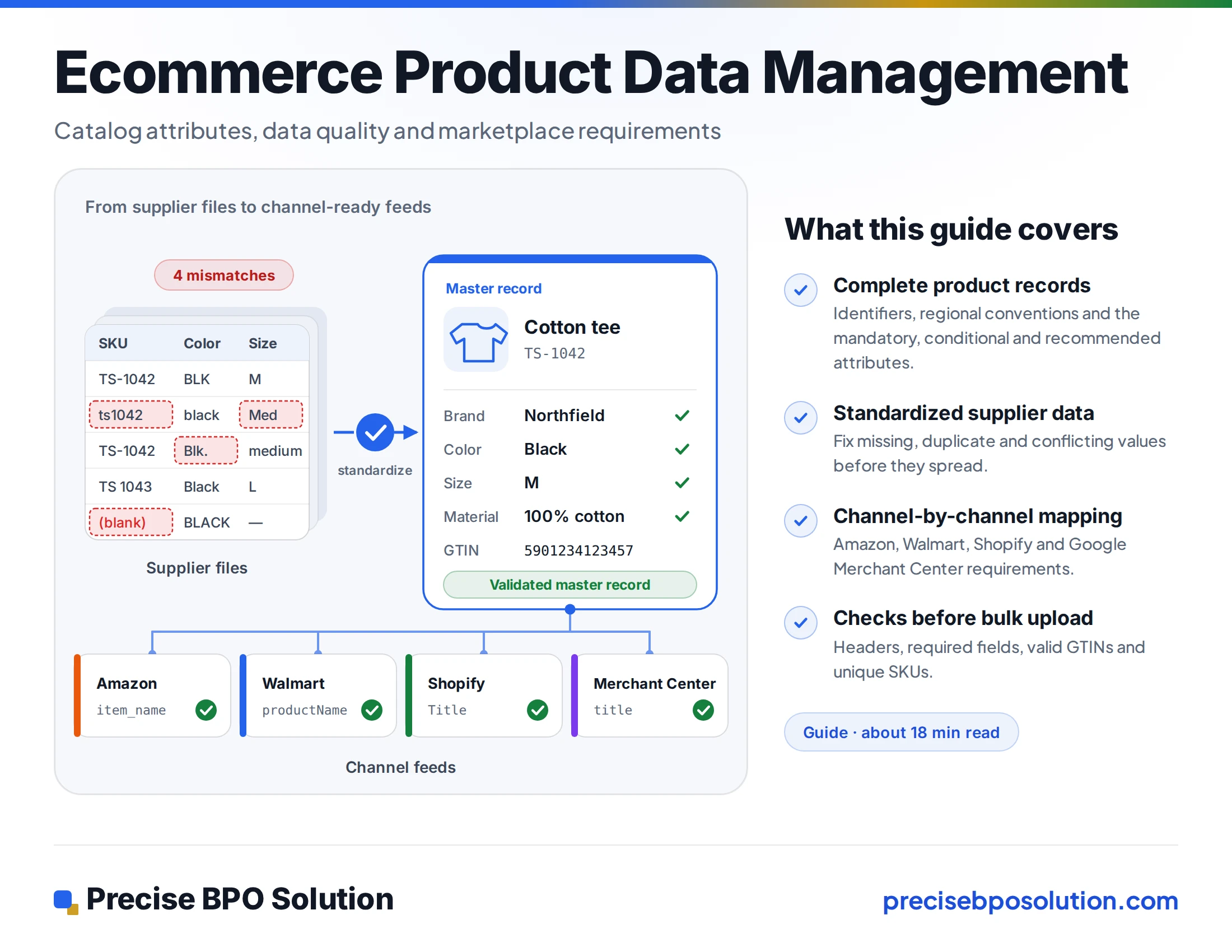
A supplier sends a spreadsheet where the same color appears as "Navy," "navy blue" and "NVY," and sizes arrive as "M," "Medium" and "38." The file uploads without complaint. Then a marketplace rejects part of it, and your own storefront filters show three separate navy options.
Problems like this rarely come from one bad record. They build up as product data passes through supplier files, internal spreadsheets and each sales channel's own template, with nobody holding a single clean version.
This guide explains how ecommerce teams selling in the US and Europe structure, standardize and validate product data so that it is ready for marketplaces and storefronts. It covers what a complete product record contains, how attributes and field mapping work, what to check before a bulk upload, how requirements differ between Amazon, Walmart, Shopify and Google Merchant Center, and when outside help is worth considering.
It is written by Precise BPO Solution (PBS), a human-led BPO provider that has supported business clients with data entry since 2008. Product data entry and related catalog operations are among the areas where we work with ecommerce brands, retailers and distributors. For many teams, the practical problem is not knowing what good data looks like but finding the hours to produce it: keying supplier information, cleaning attributes, preparing templates and keeping everything current. Outsourcing that structured, repetitive work to a dedicated team can free internal staff for merchandising, pricing and supplier relationships, so each section below also notes where that kind of support fits.
01 / FoundationsWhat Product Data Management Actually Covers
Ecommerce product data management is the work of keeping one reliable version of each product's information and delivering it to every channel in the format that channel expects. It has three layers.
- Master data. The internal source of truth for each SKU: identifiers, titles, descriptions, attributes, images, prices and logistics details.
- Channel data. The same information reshaped for each destination, such as a marketplace category template, a Shopify product CSV or a Google product feed.
- Maintenance. The ongoing changes: new SKUs, price and stock updates, revised descriptions and discontinued items.
Many catalog problems start when the first layer is skipped. Teams build each channel file directly from supplier spreadsheets, so every channel inherits the same inconsistencies and every correction has to be repeated in each one.
Each layer creates routine, high-volume work: keying and cleaning records, reshaping them to templates and keeping them current. That is the work product data entry support is designed to take on, and it is why the first layer, a clean master record, determines how much effort the other two will cost.
02 / The RecordWhat a Complete Product Record Contains
Fields vary by category and channel, but most complete records cover five groups.
| Group | Typical fields | Why it matters |
|---|---|---|
| Identity | SKU, GTIN/UPC/EAN, MPN, brand, variant group ID | Matching products, catching duplicates, grouping variants |
| Descriptive | Title, description, category, color, size, material | Search, filters and listing quality |
| Commercial | Price, currency, availability, condition | Required by most channels |
| Media | Main image, additional images, alt text | Listing approval and how the product is presented |
| Logistics and compliance | Weight, dimensions, country of origin, regulated-product flags | Required on some channels; Walmart's full-setup guide, for example, makes country of origin mandatory for item creation |
The attributes that matter most depend on the category.
| Category | Attributes shoppers filter on | Common trouble spots |
|---|---|---|
| Apparel | Color, size, gender, age group, material, fit | Mixed size systems (S/M/L and numeric); color names that differ by supplier |
| Electronics | Model number, connectivity, power or voltage, warranty | Model numbers with and without suffixes; specifications buried in descriptions |
| Home goods | Dimensions, material, pack count, assembly required | Inches mixed with centimeters; pack count written only in the title |
| Beauty | Net content, shade, skin type, ingredients | Volume given in different units; shade names that vary between suppliers |
Identifiers and regional conventions
GTIN is the umbrella term for the barcode-based product identifiers. UPC (GTIN-12) is the format most common in North America, and EAN (GTIN-13) is the format most common in Europe and much of the rest of the world. Many US and European catalogs hold both, usually in a single column with mixed lengths, which is where leading zeros get stripped and check digits get mistyped when a file passes through a spreadsheet. Store identifiers as text, keep your internal SKU separate from the GTIN, and never reuse one SKU for two different pack sizes.
Cross-border catalogs also carry regional differences that a single master record has to hold side by side:
- Units. Inches, pounds and fluid ounces for US listings; centimeters, kilograms and milliliters for most European ones. Store the measured value and unit once, then convert by rule rather than retyping.
- Size systems. US, UK and EU apparel and shoe sizes are not interchangeable. Google's specification includes a size system attribute for this reason, and a mapping should record which system each value uses.
- Prices and tax. Google's specification excludes tax from prices in the US and Canada, but expects prices to include VAT or GST for other countries, as its VAT price guidance explains. Other channels have their own rules, so record the tax basis per market.
- Language and currency. Titles, descriptions and attribute values may need a version per language, with the currency stored as a separate field.
Catalog preparation of this kind is repetitive and detail-heavy: normalizing identifiers, converting units, separating combined fields and filling findable attributes from supplier documentation. Our team handles it as human-led data entry and review inside your own spreadsheets, PIM or catalog system, working to the rules you set. See how we approach catalog preparation and bulk product data entry.
Mandatory, conditional and recommended attributes
"Required" means different things in different places. There are usually three tiers: fields every listing on a channel must have, fields required only for certain product types, and recommended fields that improve visibility but won't block a listing.
The tiers differ by channel. Google Merchant Center's product data specification lists id, title, description, link, image link, price and availability as required for every product, and adds color, size, gender and age group for apparel in several countries, including the US. Walmart's bulk full setup lists SKU, Spec Product Type and Product ID as core columns, makes country of origin mandatory for item creation, and adds a section required for the item to be visible plus sections that are conditionally required by product type. Shopify's CSV guide lists Title as the only required column when creating new products, plus URL handle when you add variants (updates require URL handle and Title). The same guide says Price defaults to 0.00 if left blank, while Shopify's import troubleshooting page still lists a "price can't be blank" error. In practice, supply prices explicitly instead of relying on either behavior.
A record that is complete for Shopify can still fail Walmart's template. Build to the strictest set of fields you expect to use, and store everything once in the master record.
Supplier information rarely arrives in your catalog format. It comes as spreadsheets with differing columns, PDF specification sheets, price lists and product brochures. We transfer the information in the files you provide into your catalog structure or template, record by record, following your field definitions. We work from the source material supplied; where a value is not in it, we flag the gap for you rather than inventing an entry. Our data conversion service can convert PDF or scanned supplier documents into usable formats first.
03 / StandardizationStandardizing Attributes Across Suppliers
Supplier files rarely agree with each other, and often don't agree with themselves. Standardization means deciding, before anything is uploaded, what a valid value looks like.
- Controlled values. Define the allowed list for attributes such as color, size, material and condition. Keep the supplier's original value in a separate column so nothing is lost.
- Units. Pick one unit per measurement and store the number and the unit in separate fields instead of free text like "6 oz."
- Formats. Fix capitalization, separators for multi-value fields, and date and currency formats.
- One meaning per field. If size only appears inside the title, filters and feeds can't use it.
A mapping table from supplier values to standard values does most of the work.
| Supplier value | Standard value |
|---|---|
| NVY, navy, Navy Blue | Navy |
| M, Med, Medium | M |
| 6oz, 6 OZ, 6 ounces | Net content: 6 · Unit: oz |
Standardization is where manual effort concentrates: working through thousands of supplier values and applying your mapping table consistently. We normalize formatting, apply your allowed values and unit rules, populate missing fields from the source information you provide, and organize records according to your rules. We keep the original supplier value alongside the standardized one and return questions about unclear values to you rather than guessing.
Missing, duplicate and conflicting data
- Missing values fall into three kinds: genuinely not applicable, findable (the manufacturer's specification sheet or packaging has it), and unknown. Fill the second kind from a documented source, leave the third blank and flag it, and never use filler. Google's specification tells merchants not to enter placeholders such as "N/A" or "Generic" in the brand field, and not to guess identifier values.
- Duplicates usually enter as the same product under two SKUs, or the same SKU twice with slightly different titles. Match on GTIN or on brand plus MPN, then review before merging, because look-alike products with different pack sizes are not duplicates.
- Conflicts appear when two sources disagree about dimensions or specifications. Set a source hierarchy in advance, for example manufacturer data first, then the supplier file, then the legacy catalog, and log every exception so the decision can be traced.
Reviewing for these three problems across a large catalog is slow, and it is easy to do inconsistently when several people split the file. A dedicated team working from a written source hierarchy and exception log gives you the same decision on the thousandth record as on the first, and gives your product team a clear list of the cases that need their judgment.
04 / MappingAttribute Mapping: From Master Record to Each Channel
Mapping is the documented link between your master fields and each channel's fields, including any transformation rule. Variant grouping is a good example, because the same idea is expressed differently on each platform:
- Shopify's product CSV repeats the URL handle on every variant row and leaves Title, Description, Vendor and Tags blank on the follow-on rows.
- Google asks for an item_group_id shared by all variants of a product, and requires it for variants in the US and several other countries, as its product data specification lists.
- Amazon's product type definitions can return a schema for a given parentage level. For variation child listings, Amazon's documentation says the parent_sku attribute is required.
One internal "variant group ID" can feed all three, but only if the mapping says how. The same applies to product type. Walmart's bulk template starts from a product type that determines which columns and allowed values appear, Amazon exposes a definition for each product type through its Selling Partner API, and Shopify expects a category that matches its standard product taxonomy, as its CSV guide describes.
A usable mapping sheet records, for each field: the master field, the target field on each channel, the transformation rule, whether it is required, and who owns it. It also becomes the training document when someone new joins the catalog team.
Maintaining that sheet and applying it to each export is ongoing work. Many teams write the mapping rules themselves and hand the application of those rules to a data entry partner, who fills the channel template, flags records the rules do not cover and returns an exceptions list. That keeps decisions about how your catalog is represented with you, and the volume work with a team sized for it.
05 / ValidationBefore a Bulk Upload: A Validation Checklist
- Check the structure first. Headers must match the template. Shopify requires the header row on the first line and a UTF-8 file (see its CSV guide and import troubleshooting), and Walmart warns in its full setup guide that changing the first six rows or the tab names of its template causes errors.
- Confirm required and conditional fields by product type. On Walmart's template, fill in the Spec Product Type column first, because it determines the remaining options. Check the conditionally required sections for every category in the file.
- Test identifiers. Google accepts only valid GTINs, meaning ones that pass the GS1 check, and says an incorrect GTIN causes disapproval (see the product data specification). Validate every barcode before it goes into any file.
- Check uniqueness. SKUs, URL handles and variant option combinations should be unique. Shopify, for instance, returns a "options are not unique" error when two variants of a product have identical option values.
- Validate values against your lists. Compare each attribute with your allowed values, units and formats. Marketplace templates add their own restrictions; Walmart's, for example, uses closed lists of values that depend on the product type, as its full setup guide explains.
- Check text and media. Google limits titles to 150 characters and descriptions to 5,000, and its specification also lists a 500 x 500 pixel minimum for product images, with enforcement starting January 31, 2027. Shopify's CSV import needs image URLs that are publicly accessible direct links to the image file (HTTPS, with no password protection, per its CSV guide), and product images can be up to 5000 x 5000 pixels, according to its import troubleshooting page.
- Run a pilot batch. Upload a small sample that covers every category and variant structure before the full file. Read the error report, and fix problems in the master data rather than in the channel file, or they will return with the next upload.
- Allow for processing time. Walmart notes that status updates in its Activity Feed can take up to 24 hours, and data errors add to that, so a quiet feed is not necessarily a finished one.
Most of this checklist is manual, record-by-record verification: missing required fields, inconsistent values, duplicate SKUs or identifiers, formatting errors and departures from your template or requirements. We check batches against the rules and templates you give us and report what was corrected and what needs your decision. Human review cannot promise a flawless file, which is why we pair it with an exceptions list and an agreed sample stage. Our product data entry service covers this checking alongside entry and cleanup.
06 / PitfallsCommon Mistakes and What They Cost
- Building channel files straight from supplier spreadsheets. Every channel carries the same errors, and every correction has to be repeated.
- Using placeholders. "N/A" brands, invented GTINs and a blanket CUSTOM product ID all cause trouble. Walmart's guide presents CUSTOM as the way to request a GTIN exemption for a product that has no GTIN, not as a blanket entry for every item, and Google warns that an incorrect GTIN leads to disapproval.
- Putting variant details only in titles. Filters, variant grouping and feeds cannot use information that isn't in a field.
- Fixing errors only in the marketplace. The master record still holds the old value, so the problem returns with the next upload.
- Treating one platform's rules as universal. A file built for one channel's template will not necessarily pass another's.
- Keeping no change log. When a listing breaks after an update, nobody can say what changed.
07 / ChannelsMarketplace-Specific Considerations
The points below come from each platform's own documentation at the time of writing. We compared these points with the platforms' own documentation in October 2026. Templates and policies change, and many rules differ by country marketplace, so check the current version for the region you sell in before building a feed.
Amazon
Required attributes depend on the product type. Amazon's Product Type Definitions API returns a JSON schema for a given product type and marketplace, and the schema can be requested for a specific parentage level. For variation child listings, the documentation says parent_sku is required. Identifier and category rules vary by marketplace, so confirm them in Seller Central for the marketplace you sell in.
Walmart
Bulk full setup (for products not already on Walmart.com) starts from a product-type template, and the Spec Product Type column must be completed first because it determines the other options. SKU is required, product IDs must follow Walmart's identifier policy, and country of origin is mandatory for item creation. Products without a GTIN can enter CUSTOM to request an exemption, which Walmart processes as an exemption request. Missing required or conditionally required information, edits to the first six rows or changed tab names lead to data errors, and status updates in the Activity Feed can take up to 24 hours, according to Walmart's full setup guide. Other methods, such as matching existing catalog items, use different templates.
Shopify
The CSV import allows up to three options per product and up to 250 images per product, and expects a UTF-8 file, as the CSV guide explains. A file that creates new products needs only the Title column (plus URL handle when adding variants), but a blank Price defaults to 0.00, so supply prices rather than risk products at zero. The product category value must come from Shopify's standard product taxonomy.
Google Merchant Center
Google's product data specification describes a product feed rather than a marketplace, but many US and European ecommerce teams maintain one alongside their marketplace listings, and the specification is a useful benchmark for core fields. It requires id, title, description, link, image link, price and availability. It asks for a GTIN on every product that has a known one and strongly recommends it otherwise, requires MPN when the product has no manufacturer GTIN, and requires brand for most new products.
Preparing the same catalog for several of these channels means several templates, several sets of allowed values and several error reports. We can assist with product data preparation, field mapping, spreadsheet formatting and upload preparation, working to the templates you supply and the platform requirements that apply to your account. We prepare and check the files; your team keeps the marketplace accounts, performs the uploads and remains responsible for compliance with each platform's current policies. We do not offer direct platform integrations or account management as part of this work.
08 / Build or OutsourceWhen Internal Processing Is Enough, and When Outside Help Makes Sense
In-house handling works well when the catalog is modest, supplier formats are few, products go to one or two channels and someone clearly owns the master data. The process above can be run by one capable catalog manager with a few well-kept spreadsheets.
Outside support tends to help when the work is large, repetitive or time-bound:
- A migration or replatforming that means restructuring thousands of records at once.
- A new supplier or brand whose data arrives in a different format.
- A seasonal or launch refresh with a fixed deadline.
- Attribute entry and cleanup that is taking the product team's time away from merchandising.
- A catalog growing faster than the team that maintains it.
What a provider can do depends on how clearly the work is defined. Before you brief anyone, prepare the mapping sheet, the allowed value lists, the source-of-truth rule, a sample of correctly finished records and a place to log exceptions. A provider working from those can follow your rules. One working without them has to guess.
09 / OutsourcingOutsourcing Ecommerce Product Data Management to Precise BPO Solution
Precise BPO Solution has been operating since 2008 and has offered data entry services since that year. We have 540+ employees, have worked with 700+ clients and operate across 27+ countries. These figures describe the company as a whole, across all of our services, and are not specific to ecommerce product data projects. Our work is human-led and our workflows are ISO 27001-aligned. For ecommerce teams, what matters is how that experience applies to catalog work.
Product data tasks we can support
| Business problem | How we can help | Typical situation |
|---|---|---|
| Supplier information to structured catalog | Entering product details from supplier spreadsheets, specification sheets and price lists into your catalog structure | New catalog, new supplier, migration or seasonal refresh |
| Inconsistent attributes | Standardizing color, size, material, dimensions and units to your allowed values and formats | Several suppliers describing the same attribute differently |
| Missing, duplicate or conflicting data | Populating gaps from the source information you provide, flagging unknowns and reviewing duplicates before merging | Legacy catalogs and merged product lists |
| Quality checks | Batch checks for missing fields, inconsistent values, duplicates and formatting against your requirements, with an exceptions report | Rejected uploads and inconsistent storefront filters |
| Marketplace and platform preparation | Field mapping, spreadsheet formatting and upload preparation to your supplied templates | Selling on several marketplaces and feeds at once |
| Ongoing maintenance | Recurring batches of new SKUs, updated specifications, price and attribute changes, corrections and discontinued items | A catalog growing faster than the team maintaining it |
What you can provide
We work from the materials and instructions you supply. Typical inputs include:
- Supplier spreadsheets (Excel or CSV), product specification sheets, price lists and catalog PDFs.
- Exports from your current catalog, ecommerce platform or PIM.
- Marketplace or platform templates you need filled.
- Your mapping sheet, allowed value lists, naming and formatting conventions, and source-of-truth rules.
- A small set of correctly finished records to use as a reference.
If a needed value is not in the material provided, we flag it for you instead of filling it with a guess. Where your instructions are incomplete, we ask before proceeding.
How a human-led team handles catalog operations
- Scope and sample. We review your source formats, attributes and volumes, and agree a sample batch.
- Agree the rules. Templates, allowed values, units and exception handling are confirmed in writing before volume work begins.
- Enter and standardize. The team transfers and normalizes records to your rules, working in your files or systems as agreed.
- Check. Batches are reviewed for missing fields, inconsistent values, duplicates and formatting issues against your requirements.
- Deliver and report. You receive completed files in your template, together with an exceptions list for items that need your decision.
- Repeat. Later batches follow the same rules, so the work stays consistent from one delivery to the next.
A retailer receives supplier spreadsheets with different column names, mixed units and color names that vary by supplier. Rather than have its product team reconcile each file by hand, it provides a template, an allowed value list and a mapping sheet. An outsourced team enters and standardizes the records against those rules, runs the agreed checks and returns a clean file with an exceptions list. The retailer's team resolves only the exceptions.
Supporting recurring and growing workloads
Catalog work does not end at launch. Ranges expand, specifications change, prices are revised and discontinued items need to be retired. A dedicated team working to documented rules can take on those recurring batches and scale up for peaks such as a migration, a new brand or a seasonal refresh, without the whole workload falling on internal staff. Capacity, turnaround and pricing depend on the scope, so we confirm them with you during discussions rather than assuming them in advance.
Discussing your requirements and requesting a sample
To scope an engagement, it helps to share your approximate catalog volume, source file formats, required attributes, validation rules and turnaround expectations. You can also ask for an initial sample or pilot batch, subject to confirmation of project scope. Read more on our Product Data Entry Services page, or contact our team to start the conversation.
10 / Next StepsWhere to Start
Clean product data is mostly a matter of order: standardize at the master record, map to each channel, validate before uploading, and fix errors at the source. The tools matter less than having written rules that everyone follows, and the capacity to apply them consistently as the catalog grows.
If your team has those rules but not the hours, or is unsure whether the rules are complete, a sample batch is a low-risk way to find out. Share a representative set of records with your template and any allowed value lists, and we can show how we would prepare, standardize and check them. Review our product data entry service for scope and approach, or discuss your product data requirements with our team: catalog volume, source formats, required attributes, validation rules and turnaround expectations.